Preparing Stocktaking: What Data Needs to Be Accurate Before the First Scan
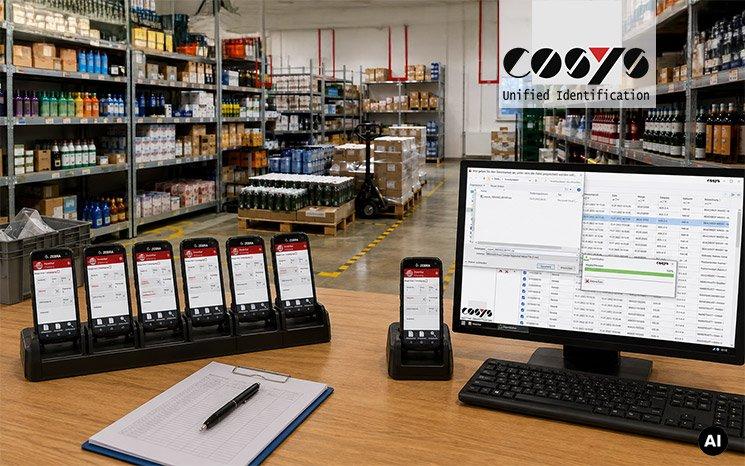
This is particularly relevant in furniture retail, DIY stores and specialist retail. In addition to sales areas, warehouses, outdoor areas, showrooms, reserve stock and other special inventory categories must be taken into account. At the same time, product ranges can extend from small parts and product variants to bulky goods and larger packaging or quantity units.
Item Master Data Forms the Basis of Every Count
Before fixed-date stocktaking begins, it must be clear which items can be counted and how they are identified in the system. Unique item numbers and barcodes are essential, along with correct descriptions, units of measure and, where applicable, variants or packaging units. Items that are no longer active should also be checked so that remaining stock can be identified and assigned correctly.
In a DIY store, for example, individual screws, packaging units, palletised goods and seasonal residual stock may all be present at the same time. Furniture retailers also have to account for display items, warehouse stock and different product variants. If the item master data has not been properly prepared, a simple scan can quickly lead to exceptions, manual checks and rework.
Stocktaking software should therefore import the item master data before the stocktaking day and establish a clear link between each barcode and the corresponding item during mobile data capture. Valuation information does not necessarily have to be available on the mobile device, but it should remain clearly linked to the counted item in the ERP or merchandise management system.
Counting Areas Must Reflect the Actual Site Layout
The next step is to define where counting will take place. Sales floors, warehouses, outdoor storage areas, showrooms, promotional areas and returns areas should be defined as clearly traceable counting areas. This is not just an organisational issue; it is essential for completeness. Poorly defined areas increase the risk of duplicate counts and missed stock.
In large retail environments, clearly defined counting areas should be assigned to individual employees or teams. This allows the stocktake manager to see which sections have already been completed and where counts are still outstanding. Historical process and stocktaking data can also help identify particularly time-consuming or unusual areas at an early stage so that they can receive greater attention during planning.
Device Allocation Should Be Completed Before the Stocktaking Day
Once items and counting areas have been prepared, the next step is to prepare the mobile devices for deployment. Every required mobile computer should be configured, charged, tested and assigned to the intended location or usage profile in good time. This includes the stocktaking application, required Wi-Fi settings, user permissions and the correct data set.
For annual or seasonal stocktakes, companies do not necessarily need to maintain a large permanent device fleet. COSYS can supplement the stocktaking solution with preconfigured rental devices, including hardware from Zebra, Honeywell and Datalogic. Mobile Device Management makes it easier, particularly for larger fleets, to deploy apps, configure devices and manage them consistently.
From Mobile Counting to Usable Inventory Data
On the stocktaking day itself, the operational process should remain as straightforward as possible. Employees open their assigned area, scan items, record quantities and close the section once it has been fully processed. In the background, the stocktake manager monitors progress and can respond to missing or unusual entries.
With the COSYS Stocktaking App and COSYS WebDesk, master data can be provided, counting tasks managed and recorded data centrally reviewed and edited. The stocktaking data is then exported to the ERP or merchandise management system. Process data analytics and business intelligence can also highlight areas with unusually high correction rates, long processing times or atypical data capture patterns.
This turns individual scans into a controlled stocktaking process. Software, rental handheld devices, MDM, interfaces and process analytics work together as part of one process instead of having to be organised separately on the stocktaking day.
Practical Tip: Run Through the Stocktaking Day Once Without Any Goods
A simple test run often reveals more than another checklist. A few days before the fixed-date stocktake, the staff responsible for the stocktake should open a typical counting area using the device that will actually be used, scan several items, enter quantities, close the area and then check whether the data appears correctly in the backend and in the intended export. If this complete workflow functions as expected, the most important handover points have already been verified before the first live scan.
Would you like to make your next fixed-date stocktake more structured and efficient?
Contact the COSYS team for individual advice on stocktaking software, rental handheld devices, device management and centralised analysis. Schedule an appointment by emailing vertrieb@cosys.de or calling +49 5062 900 0. Alternatively, you can test the free COSYS Stocktaking Demo App for Android and iOS.
Die COSYS Ident GmbH mit Sitz in Grasdorf (bei Hildesheim) besteht seit knapp 40 Jahren und ist eines der führenden Systemhäuser im Bereich mobiler Datenerfassungslösungen für Android und Windows. Ein mittelständisches Unternehmen, das seit 1982 die Entwicklung von Identifikationssystemen vorantreibt und heute branchenspezifische Komplettlösungen für nahezu alle gängigen Geschäftsprozesse anbietet. Vom Prozessdesign und der Konzepterstellung, über die Implementierung der Hard- und Software bis hin zum Projektmanagement und maßgeschneiderten Wartungsverträgen, decken wir das komplette Leistungsspektrum der Systementwicklung, Integration und Betreuung ab. Des Weiteren bietet COSYS einen Reparaturservice, WLAN-Funkvermessung, sowie Lösungen für die Bauteil-Rückverfolgung mittels DPM-Codes.
Cosys Ident GmbH
Am Kronsberg 1
31188 Holle – Grasdorf
Telefon: +49 (5062) 900-0
Telefax: +49 (5062) 900-30
http://www.cosys.de
